Setting Up a Hardware Wallet for Long-Term Cold Storage
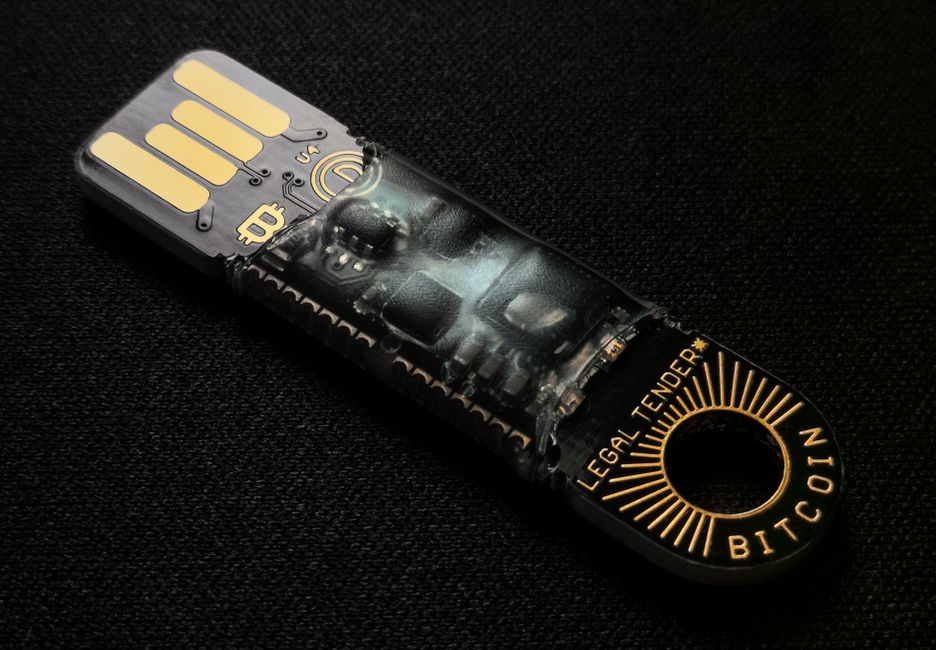
Hardware wallets are physical devices designed to keep private keys isolated from internet-connected machines. In a cold storage setup, the device signs transactions internally while the keys remain offline, which is the core reason many users consider this approach for long-term holdings. The process involves several distinct phases: verifying the device, initializing it, generating a seed phrase, recording that phrase, and then planning how it will be stored and eventually recovered. Each phase carries its own considerations, and skipping or rushing any of them can introduce avoidable risk.
This guide outlines a general, informational walkthrough of that process. It is not a substitute for the manufacturer’s documentation or for professional advice, and the specific steps can differ between devices and firmware versions. The goal is to explain the methodology behind a careful setup so that the reasoning is clear, not to prescribe a single universal procedure. Readers are encouraged to treat each step as a checkpoint rather than a formality.
The emphasis throughout is on transparency and verification. A hardware wallet is only as reliable as the environment in which it is initialized and the discipline with which its backup is handled. Understanding why each step exists helps users adapt when details vary.
Cold storage is less about a single device and more about a consistent process maintained over time.
Understanding the Purpose of a Hardware Wallet in Cold Storage
A hardware wallet is a small computing device that stores private keys in a protected element and performs signing operations internally. In cold storage usage, the device is only connected when a transaction needs to be authorized, and it is otherwise kept disconnected. This separation is intended to reduce exposure to malware, phishing pages, and remote attacks that target internet-connected systems. The device does not hold cryptocurrency itself; it holds the keys that control access to balances recorded on public blockchains.
The security model rests on a few assumptions. First, the device firmware must be genuine and unmodified. Second, the seed phrase generated during setup must remain private and intact. Third, the user must be able to recognize and reject fraudulent prompts. If any of these assumptions breaks down, the practical protection offered by the device can be reduced. For this reason, initialization is treated as a security-critical event rather than a routine configuration task.
Long-term storage also introduces considerations that differ from active use. A device might sit unused for months or years, so backup integrity, documentation, and future accessibility matter as much as the initial setup. Users sometimes forget which firmware version was installed or where the backup was placed. Recording non-sensitive metadata, such as the setup date and device model, can support later verification without revealing any secret material.
Preparing the Environment Before Initialization
Before opening the packaging, it helps to prepare a controlled environment. Choose a private location away from cameras, smart speakers, and other recording devices. Clear the workspace so that small items such as the device, cables, and written materials are not lost or mixed with unrelated papers. Good lighting and an uncluttered surface reduce the chance of mistakes during the seed phrase recording step.
Verification of the device itself is an important early checkpoint. Inspect the packaging for signs of tampering, confirm that included accessories match the manufacturer’s list, and check that any security seal is intact. The device should be obtained from the manufacturer or an authorized reseller rather than a secondary marketplace, since supply chain integrity is difficult to confirm otherwise. Once the device is in hand, the manufacturer’s official documentation should be consulted for model-specific details.
- Confirm the packaging and seals appear untouched.
- Locate the official documentation for the specific model and firmware.
- Prepare a private, well-lit workspace free of recording devices.
- Have a pen and a durable backup medium ready, but do not pre-write anything sensitive.
- Ensure a stable power source and the correct cable before starting.
The computer or phone used alongside the device also deserves attention. Use a trusted machine with an updated operating system, and avoid shared or public computers. If the manufacturer provides a companion application, download it only from the official source and verify the checksum where available. These precautions do not eliminate risk, but they reduce the number of variables that could interfere with a clean setup.
Initializing the Device and Generating the Seed Phrase Offline
Initialization typically begins by powering on the device and following the on-screen prompts. The device should generate a new wallet rather than restore an existing one, unless the intent is to recover a prior setup. Some devices offer the option to generate randomness using internal hardware; others allow additional entropy input from the user. Either approach is designed to produce a seed phrase that is unpredictable, and the device display should be the only place where the phrase appears.
The seed phrase, often twelve to twenty-four words, is the master backup of the wallet. It must be generated and displayed on the device itself, never typed into a computer or photographed. If any software or website asks for the seed phrase during setup, that is a strong signal of a phishing attempt. The device screen is the trusted reference point, and the phrase should be written down exactly as shown, in order, with correct spelling and numbering.
After recording, most devices require the user to confirm several words to verify the backup was captured correctly. This confirmation step is a deliberate check against transcription errors, which are one of the more common causes of later recovery problems. Once confirmed, the device completes initialization and may prompt for a PIN. The PIN protects the device itself, while the seed phrase protects the funds; they serve different roles and should not be confused.
The seed phrase should exist on the device display and on a durable offline backup, and nowhere else.
Firmware updates may be offered during initialization. If an update is required, verify that it is delivered through the manufacturer’s official channel and that the device display confirms the update details. Avoid updating through unofficial tools or links received by message. After initialization, it can be useful to note the firmware version and setup date in a non-sensitive record for future reference.
Recording and Storing the Seed Phrase Securely
Recording the seed phrase is the step where most long-term risk is concentrated. Write each word clearly and legibly, preserving order and numbering. Avoid digital capture of any kind, including notes apps, cloud documents, photos, and email drafts. Paper is a reasonable starting point, but it is vulnerable to fire, water, and degradation, so many users consider durable backups such as stamped metal plates. Whatever medium is chosen, the objective is to keep the phrase offline, complete, and readable years later.
Storage location is a separate decision from storage medium. A single copy creates a single point of failure; multiple copies increase exposure if any one is discovered. A common approach is to keep copies in separate, physically secure locations, with access limited to trusted individuals. The trade-off between redundancy and exposure should be considered deliberately, and any arrangement should be documented in a way that does not itself reveal the phrase.
- Write words in order with numbering and double-check spelling.
- Never store the phrase digitally or send it through messaging tools.
- Consider a durable medium resistant to fire and water.
- Distribute copies across separate secure locations if redundancy is desired.
- Avoid labeling backups in ways that reveal their contents.
- Rehearse the recovery process with a small test amount before long-term reliance.
Some users employ a passphrase in addition to the seed phrase, which adds a layer that must also be backed up separately and remembered reliably. If a passphrase is used, its loss can make the seed phrase insufficient for recovery, so the backup plan must account for both elements. Devices such as those from VaultShield may support optional features of this kind, and their documentation should be reviewed carefully before enabling anything that changes the recovery model.
Post-Setup Verification and Ongoing Maintenance
Once initialization is complete and the backup is stored, a verification step helps confirm that the entire process worked as intended. A practical method is to send a small test amount to the wallet, then perform a recovery or restore check according to the manufacturer’s instructions, confirming that the restored wallet shows the same addresses. This kind of rehearsal surfaces transcription errors or misunderstandings while the amounts involved are small. It also familiarizes the user with the recovery flow before it is needed under pressure.
Ongoing maintenance is mostly about consistency. Keep the device firmware updated through official channels when updates are available, since updates may include security fixes. Store the device in a dry, stable location, and avoid exposing it to physical stress. Periodically review whether the backup still exists, is readable, and is accessible to the intended parties. Life changes such as moving, changing trusted contacts, or altering estate plans are natural moments to revisit the storage arrangement.
It is also worth maintaining realistic expectations. A hardware wallet reduces certain categories of risk but does not eliminate all of them, and outcomes depend on device integrity, user behavior, backup durability, and many external factors. No setup can promise a particular result. The purpose of a careful process is to make the arrangement understandable, verifiable, and maintainable over the long term, which is what cold storage ultimately aims to achieve.